
2026-09-13
Learn how home automation works and how smart devices, sensors, controllers and communication networks work together. Discover smart lighting, climate, curtains, security and entertainment automation for homes in Dubai and across the UAE.
What if your home could control the lights, curtains, temperature, entertainment and security from one connected system?
That is the basic idea behind home automation.
Modern smart homes are no longer limited to individual smart bulbs, smart speakers or smartphone-controlled devices. A professionally designed home automation system in Dubai can connect multiple systems and allow them to work together through centralized controls, sensors, automation rules and intelligent scenes.
But how does home automation actually work?
In this guide, Marvis Technology LLC explains how smart home automation works, what components are involved, how devices communicate and how lighting, climate, curtains, security and entertainment can become part of one connected residential environment.
Home automation is the process of using technology to monitor, control and automate different systems within a home.
Instead of operating every system separately, automation allows compatible devices and systems to communicate through a common control architecture.
Depending on the project, homeowners may automate:
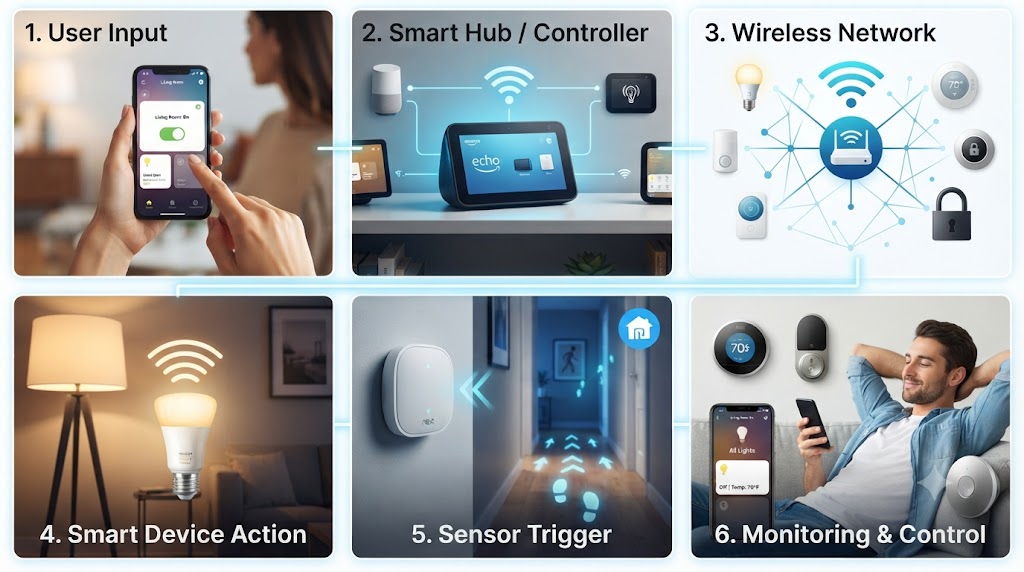
A typical home automation system works through a combination of devices, sensors, communication networks, controllers and user interfaces.
The basic process can be understood in four stages:
For example, a homeowner could activate a Movie Night scene.
The automation controller can then coordinate compatible systems to dim the lights, close motorized curtains and activate configured entertainment equipment.
The first part of a smart home is the equipment being controlled.
These can include smart lighting systems, thermostats, curtain motors, sensors, security devices, audio systems and other compatible equipment.
Each device has a specific function, but automation connects these functions into a larger system.
Sensors allow an automation system to understand conditions within a property.
Depending on the design, a smart home may use:
For example, a motion sensor can detect activity in a corridor and trigger configured lighting.
A temperature sensor can provide information to a climate-control system so that the configured temperature can be maintained.
The controller or automation platform acts as the central intelligence of the system.
It processes commands, sensor information and programmed automation rules.
Depending on the selected architecture, the controller may coordinate multiple systems such as:
This is what makes an integrated smart home different from simply having several independent smart devices.
Smart home devices need a method of communication.
Depending on the system design, communication can use wired or wireless technologies.
Wired systems can provide a structured and reliable infrastructure for larger residential projects.
KNX is one example of a building automation standard used for integrating functions such as lighting, climate control, blinds and other building automation applications.
Wireless technologies can be useful for certain devices and retrofit projects where extensive new cabling may not be practical.
The right approach depends on the property, project requirements, infrastructure and selected devices.
A smart home still needs to be easy to use.
Homeowners can control compatible systems through different interfaces, including:
The interface allows residents to manually control systems or activate predefined scenes.
Lighting is one of the most common applications of home automation.
A smart lighting system can connect different lights and zones to a central automation system.
Homeowners can then create scenes such as:
Selected entrance and living-area lights activate when the configured arrival condition is triggered.
Lights are adjusted to a softer level for an evening atmosphere.
Selected lights dim while curtains close and compatible entertainment systems activate.
Unnecessary lights turn off while selected pathway or security lighting remains active according to the configured settings.
Home automation can also connect climate-control systems.
Depending on the system, sensors and controls can provide information about temperature, occupancy and other conditions.
This allows homeowners to manage compatible HVAC systems through centralized controls and automation scenes.
For a luxury villa or large residence, different rooms or zones can have different comfort requirements.
Motorized curtains, blinds and shades can be integrated into the same automation environment.
For example, a Good Morning scene could open selected curtains while gradually activating bedroom lighting.
A Movie Night scene could close blackout curtains while dimming the lights.
This creates a coordinated experience instead of controlling each system separately.
Home automation can also connect compatible security technologies.
A residential security environment may include:
For projects in Dubai, applicable security systems and equipment should be designed and implemented according to the relevant project requirements and applicable regulatory requirements, including SIRA requirements where applicable.
Scenes are one of the most useful features of an integrated smart home.
Instead of controlling multiple devices individually, one command can trigger several predefined actions.
For example:
Movie Night = Lights 20% + Curtains Closed + Home Cinema Ready
Or:
Good Morning = Curtains Open + Bedroom Lights On + Climate Setting Adjusted
The exact actions depend on the devices and automation platform installed in the property.
Voice control provides another way to interact with compatible automation systems.
Instead of using a physical switch or smartphone, residents can use supported voice interfaces to control configured devices or scenes.
For example, a homeowner may request that the living-room lights be adjusted or a configured scene be activated.
The available commands depend on the selected voice platform and its integration with the automation system.
One of the most common questions when planning a smart home is whether to choose wired or wireless automation.
| Feature | Wired Automation | Wireless Automation |
|---|---|---|
| Infrastructure | Uses dedicated cabling for connected systems | Uses wireless communication for compatible devices |
| New Construction | Well suited to planned automation infrastructure | Can also be incorporated where appropriate |
| Retrofit | May require additional cabling | Can be useful where new wiring is limited |
| Scalability | Can support structured large-scale systems | Depends on the selected ecosystem and network |
There is no single solution for every property. The correct architecture depends on the building, electrical infrastructure, project scope and homeowner requirements.
Luxury villas often have multiple floors, bedrooms, living areas, outdoor spaces, entertainment rooms and security zones.
A properly designed smart villa automation system in Dubai can bring these systems together through centralized control.
For example, a villa may integrate:
Smart home automation is not limited to large villas.
Luxury apartments and penthouses can use automation to control lighting, curtains, climate, entertainment and selected security functions from centralized interfaces.
For existing apartments, the appropriate solution depends on the building infrastructure and the type of automation being considered.
KNX is a standardized technology used in home and building automation.
KNX can connect automation functions such as lighting, blinds, climate control, sensors and other compatible building systems through a structured architecture.
This can make KNX suitable for larger luxury residences and projects where multiple building systems need to communicate through an organized automation framework.
Consider a simple example.
You press a Movie Night button on a smart touchscreen.
One action can therefore coordinate several systems.
Yes. Automation can be triggered by different conditions depending on the system design.
Examples include:
This means homeowners do not always need to manually control every system.
Control multiple systems through centralized interfaces and customized scenes.
Coordinate lighting, climate and curtains around daily routines.
Create personalized environments for relaxing, entertaining and everyday living.
Bring different smart systems together instead of operating each device independently.
Integrate compatible security technologies and provide centralized monitoring and control.
Design an automation architecture that can expand as the property and technology requirements evolve.
Professional home automation is more than installing individual smart devices.
Marvis Technology LLC designs integrated automation solutions around the property's architecture, infrastructure and homeowner requirements.
The process can include:
Home automation works by connecting compatible devices, sensors, controllers and user interfaces so that systems can be monitored, controlled and automated according to programmed rules or user commands.
Depending on the system, homeowners can automate lighting, curtains, climate control, entertainment, CCTV, access control, gates, security systems and other compatible devices.
Not necessarily. Smart homes can use different communication technologies, including wired automation networks and wireless technologies. The requirements depend on the system architecture.
Yes. Retrofit automation can be possible depending on the property's wiring, networking, existing equipment and selected technology.
KNX is a widely used building automation standard and can be suitable for residential projects requiring structured integration of lighting, climate, blinds and other automation functions.
Compatible security systems can be integrated into a smart home environment. Applicable regulatory and project requirements should be considered when designing security systems in Dubai and the UAE.
Home automation is ultimately about making technology work together.
Instead of managing individual lights, curtains, air-conditioning systems, entertainment devices and security systems separately, an integrated smart home can bring compatible systems together through centralized controls and automated scenes.
Planning a luxury villa, apartment, penthouse or modern residence in Dubai?
Marvis Technology LLC can design a customized smart home automation solution in Dubai based on your property's requirements.
Talk to Marvis Technology on WhatsApp About Your Smart Home Project
Need help with smart home automation or security? Our experts are ready to assist you.
Fill out the form and we’ll get back to you.